
Request a refund for an Apple purchase
If you have identified the subscription is from Apple, please see the instruction below. If you have not identified where your subscription is from which platform, visit this page first: https://elsanow.freshdesk.com/en/support/solutions/articles/31000177548-identify-the-platform.
Please note that all subscriptions and transactions processed via the Apple App Store are managed and controlled by Apple*. Consequently, ELSA is not authorized to perform administrative actions such as cancellation, modification, or the issuance of refunds for these in-app purchases.
We advise you to utilize the instructions provided below to formally submit your refund request directly to Apple. The final determination regarding the refund will be made solely by Apple and cannot be overridden by ELSA.
Submit a refund request to Apple:
Please ensure that you are logged in to the correct Apple ID that you used to purchase the subscription.
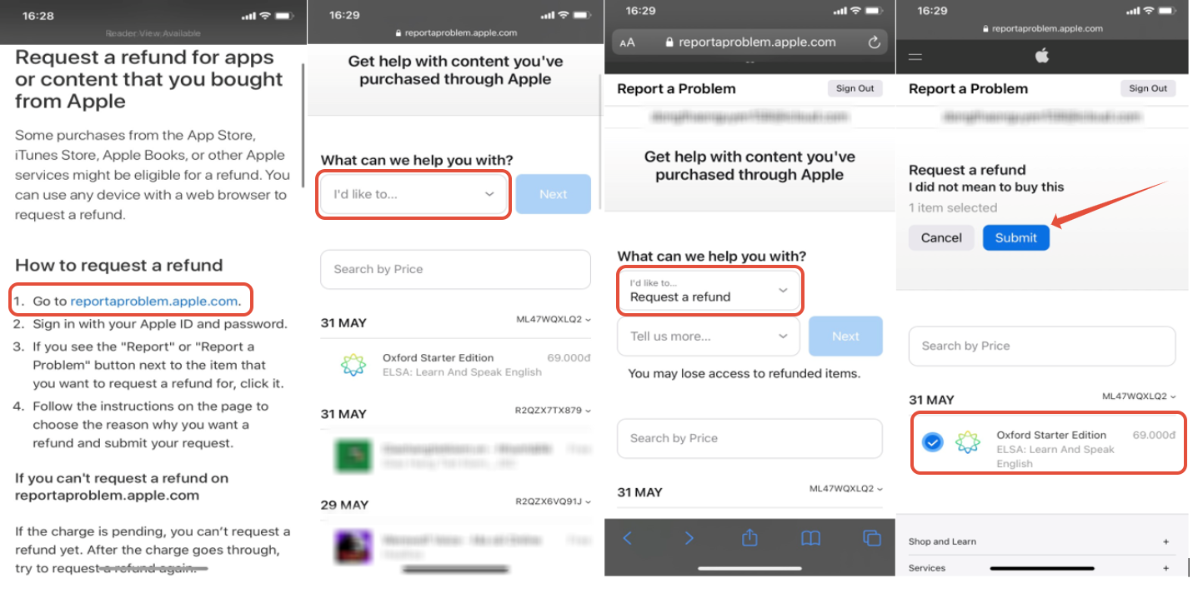
- Open the reportaproblem.apple.com > Log into with your Apple ID
- Choose your request > Request a refund
- Tick on ELSA package > Submit
Allow 24 to 48 hours to receive an update from Apple. If approved, the time it takes for the money to appear on your account or statement depends on the payment method.
To check the status of your refund request, visit this page: https://support.apple.com/en-vn/118224
*Click here to see Apple Media Services Terms and Conditions
*Click here to see Apple Developer Program License Agreement
Was this article helpful?
Or open the chat in the corner to ask follow-up questions.