
Cancel Google Subscriptions or Free Trials
Updated June 16, 2026
Important: Please read the two points below before proceeding.
- If your bank statement shows the payment comes from GOOGLE or if you receive the receipt from GOOGLE, you can follow the instructions below to cancel the subscription.
- If your subscription was not signed up via GOOGLE, this instruction below does NOT apply to your subscription. Please follow the instructions for Apple or Web instead.
--------------------------------------------------------
GOOGLE CANCELLATION INSTRUCTION:
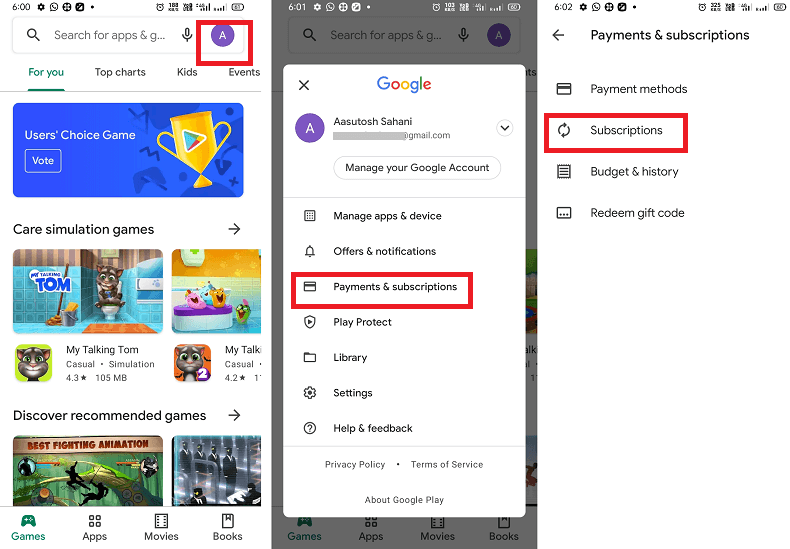
Open the Google Play app on your Android phone.
Tap on the account icon present at the top-right of the screen next to the search box.
From the list of menu options, tap on Payments & Subscriptions.
Tap on ELSA Speak.
Tap Cancel subscription and follow the on-screen instruction to complete the cancellation of the app subscription process.
Video tutorial of instruction with audio: youtube.com/watch?v=3ClJD6Y32XE&feature=youtu.be
Was this article helpful?
Or open the chat in the corner to ask follow-up questions.